
Sell online with Stripe
AI Store
A lightweight online store built right into your WordPress website: products with colors and sizes, a cart, secure Stripe Checkout and a dashboard to run it all.
The storefront
Easy to browse, easy to buy
Everything a shopper needs to find the right product, in the right color and size, and check out in a few clicks.
Category tabs
Shoppers jump straight to Backpacks, Hats, Shoes or any category you create, with a product count on every tab.
Filter & sort
Narrow the list by color and price range, then sort by featured, price low to high, high to low, or name.
Colors with their own photos
Each color is a clickable swatch, and picking one swaps in the photo for that color.
Sizes and quantity
Size buttons like S through XXL or 7 through 13, plus a quantity picker, right next to the price.
Quick add to cart
Add straight from the product grid or open a product for all its options. The cart stays in the header.
Secure Stripe Checkout
Payments run through Stripe Checkout, so card details are handled by Stripe, not your website.
Product pages
Pages built to sell
Every product gets its own page with a large photo, a short description and every option laid out clearly, so shoppers know exactly what they’re getting before they add it to the cart.
On every product page:
A photo gallery with a picture for each color.
Color and size choices that show what’s selected.
A quantity picker and an Add to Cart button with the total.
Breadcrumbs back to the store and the category.
“You may also like” suggestions to keep shoppers browsing.
The dashboard
Run your store from WordPress
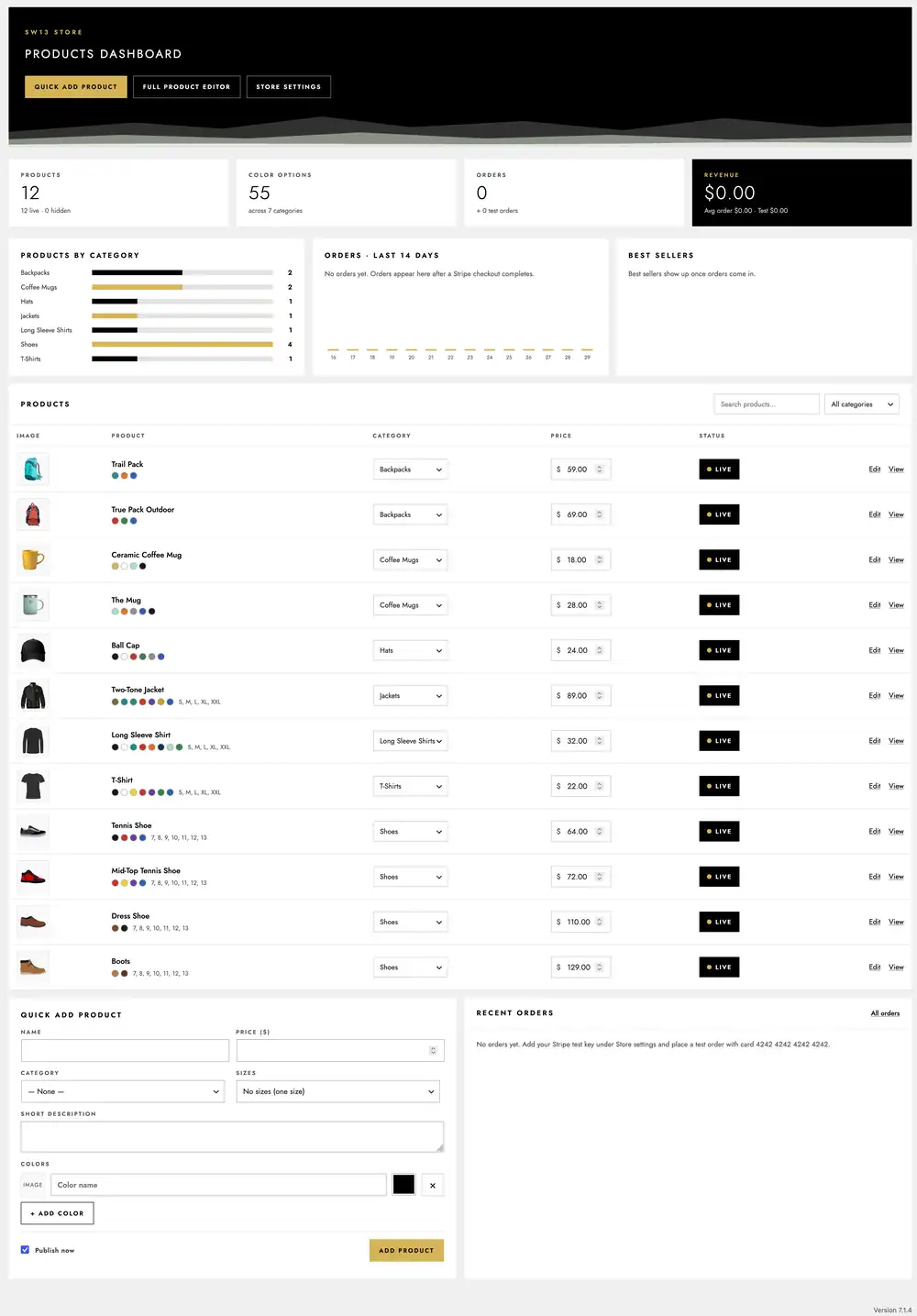
The Products Dashboard puts your whole store on one screen inside your WordPress admin. Check the numbers, update prices and add new products without digging through menus.
Store stats at a glance: products, color options, orders and revenue.
Products by category so you can see what you carry at a glance.
Orders over the last 14 days and your best sellers once sales come in.
Edit in the list: change a product’s category, price or Live status without opening it.
Search and filter every product by name or category.
Quick Add Product: name, price, category, sizes, description and colors, each with its own image.
Recent orders with a link to every order record.
Test mode: place test orders with a Stripe test key before you go live.
Click the image to enlarge
How it works
From product to paid order
Add your products
Use Quick Add for the basics or the full product editor for every detail: colors, photos, sizes and price.
Customers shop and pay
Shoppers filter, pick their options, add to cart and pay securely through Stripe Checkout.
You fill the order
Each order is saved in your dashboard with the customer’s details, ready for you to ship or deliver.
Ready to sell online?
SW13 Designs will set up the store on your WordPress website with your products, your colors and your Stripe account.